
As a reseller, it’s important to monitor the disk space and bandwidth usage of your customer accounts. WHM provides built‑in tools to review these resources so you can manage allocations effectively and ensure no account exceeds its limits.
Why Review Resource Usage?
-
Prevent accounts from exceeding disk or bandwidth quotas.
-
Identify customers who may need upgrades.
-
Ensure fair distribution of server resources.
-
Maintain overall server performance and stability.
Viewing Disk Usage
-
Log in to WebHost Manager (WHM).
-
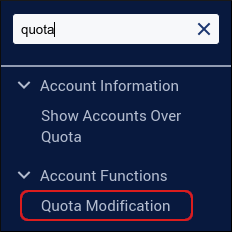
In the search box (top left), type quota.
-
Click Quota Modification when it appears.
-
Scroll to the bottom and click Show All Accounts.
-
You’ll see a breakdown of disk usage per account.
-
At the bottom of the list, WHM displays the total disk usage across all accounts.
Viewing Bandwidth Usage
-
Log in to WHM.
-
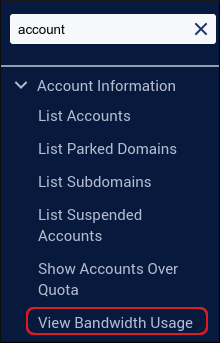
In the search box, type account.
-
Click View Bandwidth Usage.
-
You’ll see a breakdown of bandwidth usage per account.
-
At the bottom of the list, WHM displays the total bandwidth usage across all accounts.
Managing Resource Usage
-
If accounts are nearing their limits, you can:
-
Modify Account Quotas → Increase disk or bandwidth allocations.
-
Suspend Accounts → Temporarily disable accounts exceeding limits.
-
Upgrade Packages → Move customers to higher‑tier hosting plans.
-
Notes
|


