
To use Google services like Search Console, Analytics, or AdSense, you must first verify that you own your domain. This proves to Google that you control the site you’re claiming.
Prerequisite
-
Create a Google Search Console account Google Search Console account for your domain: Google Search Console Welcome Page.
Verification Methods
You only need to complete one of the following methods:
1. HTML File Upload
-
Download the verification file from Google Search Console.
-
Upload it to the root directory of your website.
-
Confirm by visiting
https://yourdomain.com/filename.html. -
Click Verify in Search Console.
2. HTML Tag
-
Copy the
<meta>tag provided by Google. -
Paste it into the
<head>section of your homepage. -
Save and publish the changes.
-
Click Verify in Search Console.
3. DNS Record (TXT or CNAME)
-
Log in to your hosting control panel (e.g., cPanel).
-
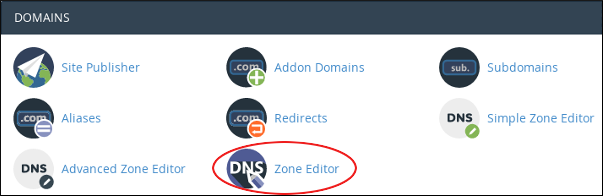
Go to Zone Editor under Domains.
-
Add a new TXT record with the unique value provided by Google.
-
For subdomains, you may use a CNAME record.
-
Wait for DNS propagation (can take up to 24 hours).
-
Click Verify in Search Console.
4. Google Analytics Tracking ID
-
If you already use Google Analytics, you can verify ownership with your tracking ID.
-
Ensure the Analytics code is installed on your site.
-
Click Verify in Search Console.
Best Practices
-
Use DNS TXT record verification for long‑term reliability.
-
Keep your verification file or tag in place, removing it may cause verification to fail later.
-
If you migrate hosting, re‑verify your site.


