
Embedding your Twitter feed into WordPress makes your site more engaging and interactive. Visitors can see your latest tweets without leaving your website. On ruachost.com, this can be done easily using a plugin.
Why Add a Twitter Feed?
-
Keeps your site fresh with real‑time updates.
-
Increases engagement by showcasing social activity.
-
Helps build brand visibility and trust.
-
Allows non‑Twitter users to view your updates directly on your site.
Steps to Display a Twitter Feed
-
Log in to WordPress with an administrator account.
-
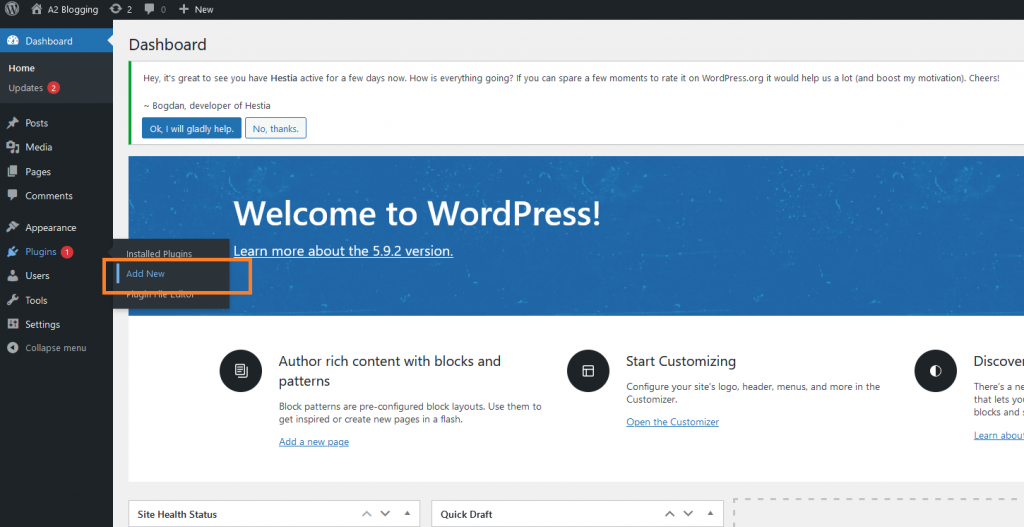
In the dashboard, go to Plugins → Add New.
-
Search for Custom Twitter Feeds.
-
Click Install Now, then Activate.
-
In the dashboard, go to Twitter Feeds.
-
Authenticate your Twitter account:
-
Click the blue button to get your Access Token and Secret.
-
Once authorized, your account details will be filled automatically.
-
-
Go to the Display Your Feed tab.
-
Copy the provided shortcode.
-
Paste the shortcode into any post, page, or widget where you want the feed to appear.
✅ Your Twitter feed will now display on your WordPress site.
Important Notes
-
Twitter only allows you to display your own feed (not others).
-
Ensure your Twitter account is active and accessible.
-
Styling options are available in the plugin settings to match your site’s design.
For More Information about X/Twitter integration, please visit: https://developer.x.com/en/docs/x-for-websites/cards/guides/cms-integration


