
Large, unoptimized images can slow down your WordPress site. The LiteSpeed Cache plugin includes built‑in image optimization tools that compress and serve images more efficiently. On ruachost.com, this helps improve site speed, SEO, and user experience.
Why Optimize Images?
-
Faster page load times.
-
Reduced bandwidth usage.
-
Improved SEO rankings.
-
Better mobile performance.
Installing LiteSpeed Cache
-
Log in to WordPress as administrator.
-
In the dashboard, go to Plugins → Add New.
-
Search for LiteSpeed Cache.
-
Click Install Now, then Activate.
✅ The plugin is now ready to configure.
⚙️ Configuring Image Optimization
-
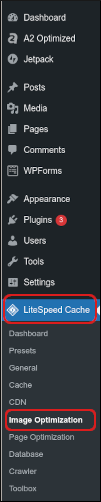
In the dashboard, go to LiteSpeed Cache → Image Optimization.
-
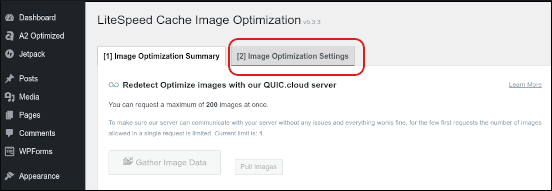
Click the Image Optimization Settings tab.
-
Configure options such as:
-
Auto Request Cron → Automatically processes optimization requests.
-
Optimize Original Images → Compresses uploaded images.
-
Remove Original Backups → Saves storage space.
-
Optimize Losslessly → Ensures no visible quality loss.
-
Lazy Load Images → Loads images only when visible on screen.
-
WebP Image Format → Serve modern, lightweight image format for supported browsers.
-
-
Click Save Changes.
Running Image Optimization
-
Go to LiteSpeed Cache → Image Optimization → Summary.
-
Click Send Optimization Request.
-
Wait for LiteSpeed’s server to process images.
-
Once complete, click Pull Images to retrieve optimized versions.
✅ Your WordPress site will now serve optimized images automatically.
Important Notes
-
Optimization is handled by LiteSpeed’s servers, processing may take time depending on image volume.
-
Always back up your site before enabling bulk optimization.
-
WebP format is recommended for maximum performance, but ensure browser compatibility.
-
Combine with caching and CDN for best results.


