
The WP Toolkit for Resellers allows hosting resellers to manage all their customers’ WordPress installations from a single interface in WebHost Manager (WHM). It provides centralized control over WordPress sites, plugins, themes, and security settings, making it easier to deliver managed WordPress hosting services.
Why Use WP Toolkit as a Reseller?
-
Manage multiple customer WordPress sites from one dashboard.
-
Install, configure, and update WordPress across accounts.
-
Control plugins and themes for all customers.
-
Apply security best practices consistently.
-
Save time by automating routine WordPress tasks.
Accessing WP Toolkit in WHM
-
Log in to WebHost Manager (WHM).
-
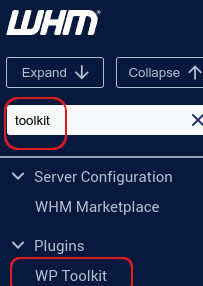
In the search box (top left), type toolkit.
-
Under Plugins, click WP Toolkit.
-
The WP Toolkit page opens with a list of all WordPress sites for you and your customers.
Managing WordPress Sites
From the WP Toolkit interface, you can:
-
Install new WordPress sites for customers.
-
Configure and manage updates for WordPress core, plugins, and themes.
-
Install, configure, and manage plugins and themes across multiple sites.
-
Check site security settings and resolve potential issues.
-
Back up and restore WordPress sites.
-
Clone and stage sites for testing and development.
Security Best Practices
As a reseller, you have direct control over customers’ WordPress sites. To keep them secure:
-
Be selective about plugins and themes you install.
-
Ensure developers actively maintain plugins/themes with good ratings.
-
Update plugins and themes regularly.
-
Use WP Toolkit’s built‑in security features to harden sites.
Notes
|


